ublo
bogdan's (micro)blog

bogdan » A Few Tips on Architecture and Attention
08:58 pm on Sep 20, 2026 | read the article | tags: ideas, medium
I like thinking about software architectures. I guess you already knew that, if you checked around here lately. I like thinking about large distributed systems and how that can take form in practice: boxes connected with arrows, queues, databases, caches, workers, clusters, and all the nice things that eventually wake somebody up at 3 in the morning.
Almost every job I’ve had forced me to do infrastructure work. Sometimes because I was the only person around, sometimes because I was managing a team and tried to protect them from the operational mess, and lately just doing it under my official job title, MLOps. The problem never changes much: you have something that needs to work and not enough people, time, or patience to operate everything that could theoretically make it work.
There’s a difference between liking something and being good at it. I’ve made my share of bad architectural decisions. But, more importantly, I had to live with them. Now, after all these years, my idea of what makes a good system has changed. I care less than I used to about finding the «best» component, and much more about what happens after the choice is made. After the benchmarks are forgotten and somebody has to upgrade it, recover it, or debug it at 2:00 a.m.
Tip #1: Knowledge is part of the infrastructure!
One of the first large systems I operated was a very popular radio station website receiving hundreds of thousands of requests per minute. I chose Apache HTTP Server. There were plenty of reasons why that was a bad idea at that scale, but Apache had one massive advantage that didn’t appear in any benchmarks: I knew it very well (at least back then). I knew how it failed, where the config files lived, which knobs were dangerous, what the logs meant, and when something broke I already had a full mental list of stupid things to try.
The launch wasn’t without incidents, but most took minutes to resolve rather than hours because very little was surprising. Once things settled down, I evaluated alternatives and eventually replaced Apache with Nginx, which was the better solution. Apache was probably the better first decision. There is a difference.
We usually compare technology as if the people using it don’t exist: throughput, latency, features, cost, GitHub stars. But knowledge is part of the infrastructure too. A component that is worse on paper but whose failure modes you understand can easily be cheaper than a perfect component you don’t know how to recover.
This isn’t at all an excuse to stop learning. There is still a minimum technical bar a component has to pass. Yet after that threshold, I no longer ask only whether a component solves the problem. I ask how expensive it will be for us to understand it when it doesn’t.
Tip #2: Architecture Belongs to the Operator
If I’m working alone, using something I know inside-out has enormous value. In a team, using something only I know becomes a liability.
Let’s say I use a Mac and everybody else uses Linux. I can write beautiful automation around whatever BSD-flavoured utilities happen to be on my machine. It works great until I go on vacation. Maybe rewriting it in JavaScript adds a runtime where a shell script would have been enough, but if everybody on the team can understand and maintain it, JavaScript may actually be the simpler system.
Architecture doesn’t belong to the architect. It belongs to whoever has to maintain it after the architect gets bored, promoted, fired, or simply goes offline for a week.
A system with five dull components understood by ten people can be much safer than a system with three brilliant components understood by one. This doesn’t mean choosing the lowest common denominator forever, but novelty has a cost. Introduce a new language, database, deployment model, and orchestrator in the same project and you may have built a training program disguised as software architecture.
Tip #3: Choose Small Contracts over Large Features
Years ago I worked on the foundation for dozens of news websites. The obvious choices were systems like Joomla or Drupal, which could do almost everything. That was exactly the problem: they could do almost everything, and brought their own abstractions, plugin systems, conventions, and assumptions about how the rest of the application should work.
Instead, I picked a much smaller CMS. It couldn’t do much, but it had clean boundaries around what it did, which meant we could attach other systems for streaming, encoding, publishing, and whatever strange requirement appeared next. That small core eventually became the basis for more than 60 projects because it didn’t insist on owning the entire architecture.
There’s this temptation to choose the component that covers the largest possible surface of the future. It sounds responsible. Except next year’s problems have an annoying habit of being different from the ones we imagined (remember LLMs?), while we pay for all the hypothetical features today in configuration complexity, upgrade pain, and coupling.
No worries. I don’t hunt for simple implementations as PostgreSQL and Linux are anything but simple. I hunt for small contracts and small operational surfaces.
Tip #4: There’s always the (hidden) cost of Human Attention
Qdrant is a good recent example. There are vector databases with better performance for particular workloads and products with more features. What I like about Qdrant would make a data scientist less excited: I can run it locally without reproducing a small data center, clustering is understandable, snapshots are straightforward, and recovery doesn’t require learning five other systems first.
Every component creates work twice: once when you build the system, and then forever. Upgrades, monitoring, backups, security patches, incidents, onboarding, and there’s also that strange problem that shows up every time there’s a team-building and nobody remembers how to fix.
Automation belongs in the same calculation. A mediocre component with good operational automation can easily be cheaper than a better component that requires humans to recover it.
Compute is expensive because AWS sends you a bill every month, yet human attention is easier to miss because nobody sends a sanity invoice when three engineers spend two days diagnosing an unhappy cluster.
Human attention is part of the infrastructure cost. It just doesn’t appear on the same cloud invoice.
One of my former CEOs used to say that with money, anybody can solve any problem. I don’t think that’s quite true. With money, many capacity problems get solved, but constraints don’t disappear because you have a larger credit card. Sometimes throwing 10x the compute at a rare spike is exactly the right answer.
Money buys margin and time, but it doesn’t automatically buy understanding. Throwing 10x at the problem just because nobody understands why 1x stopped working is something else.
Tip #5: The harder it is to undo, the more time it deserves
I recently watched two teams tackle vector search. One spent months understanding the workload, testing locally, simulating production traffic, and identifying bottlenecks, so a year later their setup has scaled with no major incidents. The other mostly added compute when things became slow. Incidents started almost immediately and eventually affected the release of a new long-sought feature.
Engineers, me included, like product questions because they have concrete answers. Which vector database? Which queue? Which LLM gateway? The boring questions matter more. How much data is there? How often does it change? How bad is stale data? What happens during a ten-minute outage? What’s the actual p99 we need? Who gets called when it breaks?
There is rarely a best component for a category. More often, there is a component that behaves better under a particular collection of constraints.
The other question is how painful a wrong decision will be. My Apache choice was relatively easy to undo because the web server sat behind a clean boundary. Changing the way an entire company represents customer identity is something else.
Architectural effort should be spent in proportion to how difficult a decision is to reverse. Move quickly on reversible choices and do thorough analysis on the ones that will hurt later.
And now, the conclusion
Maybe the useful question is not «What is the best architecture?» but «What is the cheapest architecture we can understand, operate, and change while still satisfying the actual constraints?»
In distributed architectures, cheap doesn’t mean the smallest cloud bill. It means attention: how much of the system somebody has to keep in their head, how many specialists are required when something breaks, how many people can safely change it, and how much new knowledge is required before touching it.
For a large company, some of this can be purchased. There’s a database team, infrastructure, security, SRE, and somebody whose entire job is understanding one particularly angry Kafka cluster. For a team of five, there’s Bogdan. And Bogdan doesn’t feel like working today.
Once something is technically good enough, I increasingly optimize for a different set of things (here’s a nicer list-like set of tips):
- Prefer things you understand, unless the unfamiliar thing buys you both lunch and dinner.
- Keep contracts small, so changing your mind doesn’t require changing everything.
- Automate the things that happen twice, because twice quickly becomes twenty times.
- Spread the knowledge around, and worry about anyone who’s always too busy to write some docs.
- Spend analysis on decisions that are painful to reverse, and yes, YOLO everything else.
The goal isn’t to design a perfect architecture from day one, but to build a system you can run safely today, while leaving enough room to change your mind tomorrow.
Because eventually, the most expensive architecture isn’t the one with the highest cloud bill. It’s the one you can no longer afford to understand.
bogdan » A minimum viable experimentation platform for AI agents
09:19 pm on Sep 12, 2026 | read the article | tags: ideas, medium
If you don’t already know, I’ve been toying lately with enterprise AI agents. Here’s the article A minimum viable platform for enterprise AI agents. So, it made me think about how I would decide whether a new version of an AI agent is actually better than the one already running in production.
During development, the process is usually manageable: keep a set of test cases, run both versions, inspect a few traces, ask another model to grade the results and decide whether the change looks promising enough to continue. This is far more difficult when the thing being evaluated is not just a prompt or a model call, but an entire system made of components that change independently and influence each other in ways that are not always obvious.
Imagine a customer-support agent built from:
agent runtime
memory and retrieval
system prompt
model
tools
guardrails
application logic
The retrieval strategy changes and task completion improves on the test set. Maybe the agent is better, yet it may also make more model calls, cost 20% more, behave differently on real users, or simply benefit from another component that changed during the same period. At that point the problem starts looking more like experimentation and less like model evaluation.
So here’s my attempt to design the smallest platform I would be comfortable using to answer a fairly simple question:
should version B replace version A?
There is obviously a scale assumption here: if there’s only one agent, twenty manually reviewed test cases and a few internal users, most of the platform is unnecessary. It starts becoming useful when several teams change models, prompts, memory, tools and agent implementations independently, experiments run continuously, and somebody eventually needs to make a production decision based on evidence that should remain understandable a few months later. Thus, a perfect fit for my enterprise AI agents platform scenario.
Defining what B actually is
The first problem is basic. Let’s assume an experiment says:
A = agent-v17
B = agent-v18
What exactly is agent-v18?
If the prompt changes during the experiment, the retrieval index is rebuilt and the model gateway changes its default model, the label itself tells me very little about what was actually evaluated. This applies especially to agents because the behavior seen at the end is the result of the entire pipeline, not of one isolated model invocation.
Hence, the immutable pipeline definition is the treatment being evaluated. Something like:
pipeline:
  name: support-agent
  version: 18

components:

  runtime:
    artifact: agent-runtime@sha256:...

  memory:
    artifact: memory-service@sha256:...
    configuration:
      strategy: hybrid
      top_k: 8

  model:
    route: support
    model: provider/model-x

  prompt:
    artifact: sha256:...

  tools:
    - artifact: customer-lookup@sha256:...
    - artifact: refund-tool@sha256:...
The exact artifact format is not particularly important. What matters is that an experimental variant can be reconstructed as a system configuration and that, months later, someone can answer what a user assigned to B was supposed to execute. This also keeps the experimentation platform independent of what is changing.
One experiment may compare:
model X vs model Y
another:
memory top_k=5 vs top_k=8
and another may compare two completely different agent implementations. From the point of view of the experiment, all of them are pipeline variants. Once an experiment starts, freeze those definitions. If the treatment changes, create a new experiment iteration rather than silently rewriting what B meant historically.
Assignment is not (another) production dependency
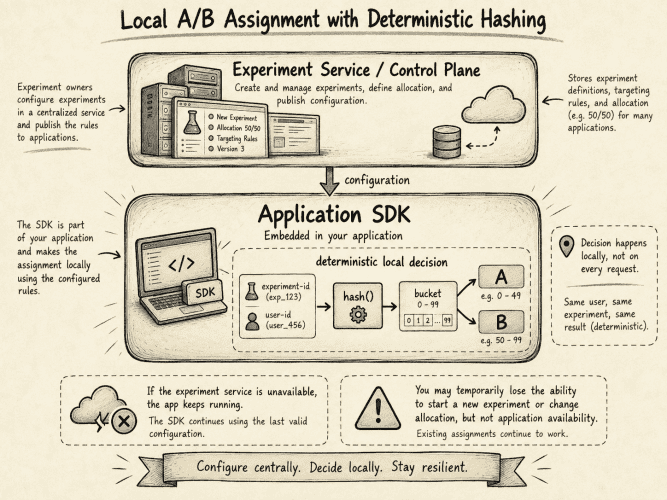
The next problem is deciding who gets A and who gets B. There is a tempting implementation in which every request asks a central experimentation service for its treatment (seen it!), but that also means that the experimentation platform becomes (a critical) part of the availability and latency budget of the application itself, which seems like a poor trade for something whose primary purpose is measurement.
The first version uses deterministic hashing. The experiment control plane publishes the current configuration to an SDK embedded in the application, while the actual decision happens locally, giving the platform a useful failure property: if the experiment service is unavailable, the platform temporarily loses the ability to start a new experiment or change an allocation, but the application is unaffected, with the SDK continuing to use its last valid configuration.
For the MVP, support a few useful randomization units:
request
user
session
workflow_instance
The last one exists mostly because agents do not necessarily share the lifetime of a web request. An agent may start a repository migration today, wait for an external approval and continue tomorrow. If the assignment is recalculated from tomorrow’s experiment configuration, the same workflow may start on one implementation and finish on another, which makes both operational behavior and analysis unnecessarily difficult.
The assignment therefore remains pinned:
workflow_instance = migration-8291
variant           = B
pipeline          = agent-v18
and is carried every time the workflow resumes.
Assignment is not exposure
There is another distinction that becomes important as soon as the treatment is a component somewhere inside an agent pipeline: being assigned to a treatment does not mean that treatment actually participated in the execution.
Suppose I am testing two memory implementations and a user is assigned to B: memory-v2, but the agent answers the request without performing a memory lookup. The assignment exists, but the component under test never had an opportunity to influence the outcome.
Let’s keep those as separate events:
ASSIGNMENT
user-18271 → B

EXPOSURE
memory-v2 retrieval started
This gives useful experiment-health information as well. Instead of seeing only the number of users randomized to each arm, I can also inspect:
assigned          10,428
exposed            8,912
exposure rate      85.46%
If A and B have unexpectedly different exposure rates, investigate that difference first. A related problem appears when the treatment that was assigned is not the one that eventually executes. Suppose B selects model Y, model Y fails (with 503) and the gateway falls back to X. The record will show:
assigned_variant = B
realized_model   = X
fallback_reason  = provider_unavailable
the execution stays in B.
This is the usual Intent-to-Treat, or ITT, principle: analyze the subject according to the treatment it was randomized to, even when the realized execution deviates from that treatment. In this example the fallback behavior is itself part of what users experience when they are assigned to B, and removing those requests after the fact would change the population based on something that happened after randomization.
Exposure and realized-treatment information are still valuable, but primarily as experiment-health and diagnostic signals unless the analysis explicitly defines something else.
Traces explain what happened
The experiment result tells me whether an outcome changed. It does not tell me why.
An agent execution may look like:
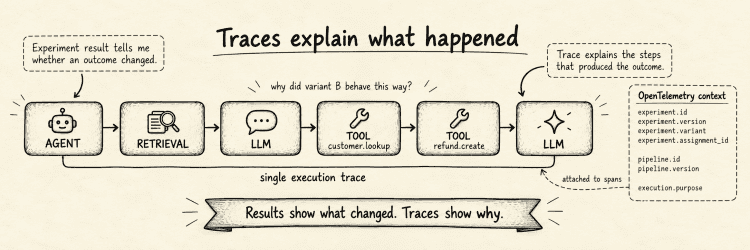
Use OpenTelemetry for this rather than inventing another tracing protocol. The experimentation layer only needs to attach a small amount of additional context:
experiment.id
experiment.version
experiment.variant
experiment.assignment_id

pipeline.id
pipeline.version

execution.purpose
Now, move from an aggregate result such as:
B has a lower task completion rate
to a much more useful question:
show failed B traces
and inspect whether the new pipeline retrieves worse context, retries tools, falls back to another model, enters loops, or simply takes longer paths through the same task.
The trace itself is not the experiment record though. A trace is very good at explaining how one execution unfolded, but experimental outcomes do not necessarily share its lifetime. A customer may interact with an agent today and renew a subscription a week later, at which point the original trace has long finished.
So keep a smaller experiment event stream alongside tracing:
assignment
exposure
outcome
feedback
evaluation
The trace records execution. The event stream provides the bookkeeping needed to connect randomization to outcomes that may arrive later.
Offline evaluation uses the same pipeline
Before putting B in front of production users, test it against known scenarios. For agents specifically, a scenario shouldn’t be reduced to:
prompt
expected answer
because the interesting result may not be the text returned by the model at all. It may be what happened to the environment. A customer-support scenario could look like:
scenario:
  id: duplicate-charge-001

input:
  message: >
    I was charged twice for order 9811.

environment:
  fixture: duplicate-charge-customer

expected:
  refund_count: 1
  ticket_status: resolved

limits:
  max_turns: 15
  max_tool_calls: 20
  max_cost: 0.50
Then run the same scenario for both pipeline A and pipeline B, possibly several times, because agent executions are stochastic and two runs of the same configuration may follow different trajectories even when they start from equivalent state. The MVP uses a resettable sandbox containing fixture-backed services or test databases. Don’t try to build general multi-turn trace replay yet.
Replay works while the new candidate asks for interactions that were already recorded. If candidate B takes a different decision on turn three and calls a tool that the original trajectory never called, there is no recorded world in which that branch exists.
At that point the useful result is:
REPLAY_DIVERGED
rather than inventing a mock response and pretending the execution is still a replay.
A stateful sandbox lets both agents branch naturally while keeping their starting conditions controlled, which seems like a better first approximation of how agent evaluation should work.
Shadow execution bridges the gap between offline and production
There is one useful step between a controlled sandbox and exposing users to B: run B asynchronously against a copy of real production inputs without serving its output.
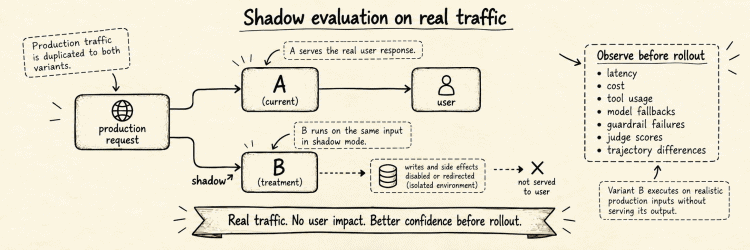
Variant B executes on realistic traffic, while writes and external side effects are either disabled or redirected to an isolated environment.
This provides production-like inputs and allows observation of:
latency
cost
tool usage
model fallbacks
guardrail failures
judge scores
trajectory differences
before the treatment reaches users.
Shadow execution still doesn’t tell me whether B improves the outcome I ultimately care about, because users never experience B and therefore cannot react to it. What it gives is an intermediate deployment step: realistic input distributions and runtime behavior without accepting the full product risk of a live experiment.
Not everything needs an LLM judge
Once the agent finishes a scenario, I still need to evaluate the result. That’s why the first version uses two kinds of evaluator.
The first is deterministic. If the task was to issue exactly one refund and resolve a ticket, inspect the environment:
refund_count == 1
ticket_status == resolved
There is little benefit in asking another model whether it thinks the agent probably completed a task when I can verify the resulting state directly.
The second evaluator is model-based. Some properties are difficult to express as assertions:
helpfulness
clarity
tone
quality of explanation
For those, an LLM judge comes in handy, but the judge becomes another versioned component rather than an anonymous source of truth:
evaluator
evaluator version
judge model
judge prompt
rubric
Every generated score keeps that provenance.
I also need to maintain a small human-labelled calibration dataset and periodically compare the judge against it. An LLM judge is a measurement instrument; if the instrument changes, I want to know whether its measurements have changed as well.
Agentic judges that browse, call tools or investigate additional evidence are useful and probably unavoidable for some domains, but they don’t have a place in the first version.
Oh! About the statistics
There is a lot of sophistication available in mature experimentation systems, but my go-to choice is to implement a small set of methods correctly rather than start with an impressive statistical menu that few users understand.
Here’s what the first version supports:
A/B allocation
binary metrics
continuous metrics
95% confidence intervals
sample ratio mismatch detection
fixed-horizon analysis
That is enough to answer many useful questions.
For example:
Experiment
support-agent-v18

Randomization
user

Primary metric
ticket resolution

A       81.4%
B       85.1%

Difference
+3.7 percentage points

95% CI
[...]

Experiment health
SRM PASS
Sample ratio mismatch is particularly important because a result should not look authoritative when the randomization itself appears broken. If I intended to assign users 50/50 and observed something sufficiently inconsistent with that expectation, I would rather mark the experiment unhealthy and stop there than display a winner with a warning icon next to it.
The same health layer should enforce operational guardrails. An agent variant can fail economically without failing technically. A prompt loop that turns:
4 model calls
into:
47 model calls
may still return HTTP 200 and even produce a good answer.
So hard experiment limits become necessary, like:
max cost / execution
max tokens / execution
max agent turns
max tool calls
max variant spend / hour
Crossing one of those limits can stop an execution or pause further exposure to that variant.
For example:
Variant B

SRM                PASS
Error rate         PASS
Cost / request     +312%

Circuit breaker    TRIPPED
New exposure       PAUSED
The circuit breaker is not a statistical conclusion, but simply an operational safety mechanism that prevents a pathological treatment from consuming traffic and budget while the experiment is still gathering enough observations to say anything interesting statistically.
More sophisticated capabilities can come later: CUPED, sequential testing, holdouts, experiment layers, cluster randomization, adaptive allocation and so on.
The data model should leave room for them. The first implementation only needs to get ordinary A/B experiments right.
What to build first
After removing most of the things that can wait, the platform is manageable. It just needs a control service containing:
- Experiment Registry
- Pipeline Registry
- Dataset Registry
- Evaluator Registry
- Metric definitions
On top of this sits the SDK, which downloads experiment configuration and performs deterministic assignment locally. The platform also needs an ingestion path for:
assignment
exposure
outcome
feedback
evaluation
together with OpenTelemetry traces.
For storage, PostgreSQL is a solid choice for control-plane state, NATS JetStream or Kafka for event ingestion, ClickHouse for experiment and trace analytics, and S3-compatible object storage for larger artifacts.
The platform also needs an offline runner that executes a dataset against A and B inside resettable environments.
The resulting architecture is roughly:
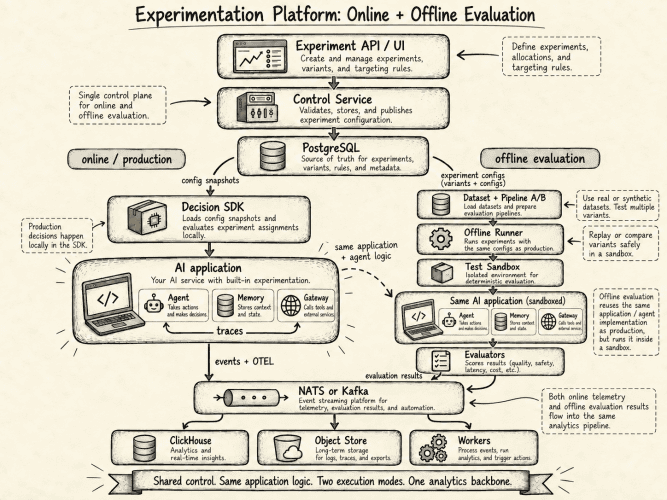
There are plenty of things missing.
The MVP doesn’t solve arbitrary stateful environment virtualization, sophisticated experiment interaction, evaluator drift, automated root-cause analysis, persistent treatment effects or multi-agent causal attribution, and I don’t think the MVP needs to solve them.
What matters from the beginning are the parts that become difficult to repair after historical data already depends on them:
what was randomized
what treatment was assigned
what treatment actually ran
what pipeline version produced the execution
what outcome was measured
how that outcome was evaluated
If those identities survive the first implementation, the system can become considerably more sophisticated without changing the meaning of its old experiments.
The useful connection for me is that offline evaluation, shadow execution and online experimentation can share pipeline definitions, traces and evaluator infrastructure while still answering different questions.
Offline evaluation shows how A and B behave in controlled scenarios. Shadow execution shows how B behaves on production inputs without affecting users. Production experimentation shows what changes when real users are randomly assigned to A or B. Tracing gives evidence about what happened inside each execution and helps explain the result without pretending that a trace-level diagnosis is itself a causal estimate. And that should be enough for an MVP that will be able to answer three questions reliably:
What exactly did we run?
What happened when we ran it?
Did assigning users to B improve the outcome we care about?
Everything else can grow around that.
I’ve placed a more detailed, full-fledged version of the architecture here and an attempt for an MVP here. Feel free to check them out and send feedback.
bogdan » A minimum viable platform for enterprise AI agents
07:38 pm on Aug 8, 2026 | read the article | tags: ideas, medium
I’ve been thinking lately about what happens when AI agents stop being something that a few people experiment with and become a normal way of doing work inside a company.
The user experience is already surprisingly good. I can ask Claude or ChatGPT to inspect something, write some code, search through documents or interact with other applications. With a little configuration, an agent can use Slack, GitHub, Jira or whatever else I happen to need.
The problems start when I want to treat this as infrastructure.
Imagine I tell an agent:
look at the open production incidents, check whether any recent deployment correlates with them, ask the relevant engineers for context and give me a summary tomorrow morning.
There’s nothing particularly exotic about the task. The agent needs to read a few systems, send a couple of messages and wait.
Still, several questions appear immediately.
Whose permissions does it use? Where are the credentials stored? What happens if one of the Slack messages contains a prompt injection? Does the task stop when I close my laptop? If my GitHub permissions are revoked while the agent is sleeping, can it still act tomorrow? If it decides that restarting a service would help, who makes that decision? And, two weeks later, can somebody reconstruct what actually happened?
These are mostly old infrastructure problems showing up in a new place.
So I tried to design the smallest platform I would be comfortable deploying in a company where agents are expected to become common.
There is a scale assumption hidden in that sentence. If a company has two read-only agents, each talking to one API using tightly scoped credentials, most of what follows is probably unnecessary. The platform starts earning its cost once multiple teams are deploying agents, tasks become long-running, agents can create side effects, integrations are shared, or somebody needs to answer audit and incident-response questions afterwards.
Starting with one assumption
The most useful assumption I found is that the agent harness should not be a security boundary.
By harness I mean the code around the model: Claude Agent SDK, OpenAI Agents SDK, LangGraph, Google ADK or some internal loop that calls a model, gives it tools and keeps going until the task is done.
There will probably be many of them.
More importantly, the harness is processing untrusted information all the time. A GitHub issue can contain instructions. A web page can contain instructions. A PDF can contain instructions. A tool response can contain instructions. The model itself can simply make a mistake.
Trying to make every possible harness perfectly safe doesn’t look like a useful enterprise strategy.
⚠️ I would let the harness decide what it wants to do and move the decision of what it may do somewhere else.
For example, the model can produce:
github.pull.comment(
    repository = "payments",
    pull_request = 842,
    text = "..."
)
The platform decides whether that call actually reaches GitHub.
This distinction simplifies quite a lot of the architecture.
Alice and the agent acting for Alice
The next problem is identity.
Suppose Alice can read a repository, merge pull requests and change repository settings. Giving an assistant Alice’s full GitHub access is technically convenient and a fairly bad default.
The useful permission set is closer to:
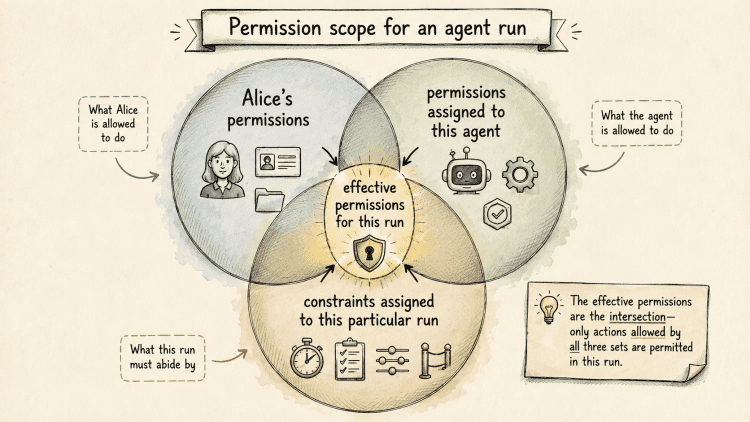
So Alice may be able to administer a repository, while a code-review agent acting for Alice can only read code and comment on a particular pull request.
For more sensitive jobs I wouldn’t delegate the capability to a generic assistant at all.
A production deployment agent, for example, can be registered independently, have a dedicated owner, a small set of tools and a separate approval policy. The general assistant can ask that specialized agent to perform a job; it doesn’t acquire the production role itself.
There are already standards that give us most of the primitives needed here. OAuth token exchange, standardized in RFC 8693, can represent a user as the subject and another actor acting on the user’s behalf. Workload identity systems such as SPIFFE solve the related problem of identifying the process making the request.
In this architecture, token exchange is also where I would derive short-lived, audience-restricted authority for the particular run. The harness doesn’t need Alice’s refresh token or another persistent credential. It receives, or ideally merely carries the context for obtaining, authority constrained to something like run-12345, the intended resource and the permissions assigned to that run.
The important part for an MVP isn’t adopting every possible identity mechanism from day one.
It’s preserving three identities separately:
Alice
PR-review-agent
run-12345
Once those three values disappear into a shared service account, most of the interesting governance possibilities disappear with them.
Tools belong behind a gateway
I would apply the same principle to credentials.
An agent shouldn’t receive Alice’s Slack cookie, a GitHub PAT or an OAuth refresh token and then be trusted to behave responsibly with it.
Instead, enterprise tools go behind a gateway.
MCP is convenient here because it gives agents a common way to discover and call tools. MCP is also moving toward more centrally managed enterprise deployments: its Enterprise-Managed Authorization extension allows an organization’s identity provider to participate in how access to MCP servers is provisioned and authorized. I wouldn’t make the architecture depend on every MCP client implementing that model correctly, but the direction is useful.
From the agent’s point of view, things remain simple:
slack.search
slack<.send
github.pull.read
github.pull.comment
jira.issue.read
The gateway performs the less interesting work.
It verifies who is calling, checks the user and agent policy, applies resource constraints, obtains whatever downstream credential is necessary, performs the call and records the result.
For the MVP, I would treat authorization policy like any other versioned infrastructure configuration. Something like OPA/Rego, Cedar or an equivalent policy engine can express the rules; the exact choice matters less than making the policy reviewable, testable and attaching its version to every consequential decision.
A rule might express:
agent = pr-review-agent
user = Alice
repository = payments
action = github.pull.comment
expires < 17:00
The credential never needs to enter the model context.
It doesn’t necessarily need to enter the harness process either.
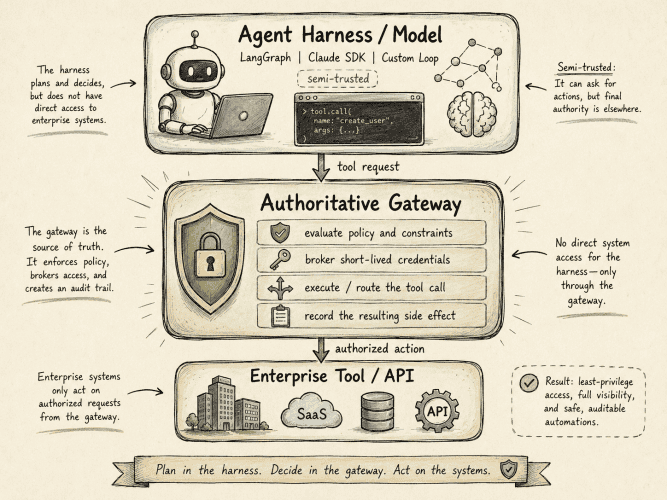
This is useful even if prompt injection becomes dramatically easier to detect.
Security scanners and model guardrails can reduce the number of bad requests. Authorization still has to decide whether a request is legal.
If the incident-analysis agent suddenly requests:
github.repository.delete(...)
the answer should come from policy rather than from our confidence in the prompt.
There is an obvious cost to this design: every tool call now crosses another network boundary and may involve policy evaluation or credential brokerage. A chatty agent making dozens of calls will notice that latency. Some decisions and short-lived credentials can be cached safely, but the gateway is still deliberately on the critical path.
It also becomes critical infrastructure. For write operations, I would rather fail closed during a policy-engine or credential-broker outage than let the harness bypass the gateway. That availability trade-off is part of the price of making the gateway the authorization boundary.
Moving the task away from the laptop
So far this still works with an agent running on somebody’s MacBook. That stops being convenient as soon as tasks take a long time.
The incident example might send a Slack message and then wait six hours for somebody to answer. A procurement agent may wait two days for an approval. Another task may need to run every Monday morning. At this point I don’t think the employee’s computer should have anything to do with the lifetime of the task.
The useful invariant is:
worker process lifetime != workflow run lifetime
A worker may exist for a few minutes while the run may exist for two days.
For an MVP I would use Kubernetes for compute and something like Temporal for the logical execution. They solve different problems: Kubernetes gives me workers, scheduling, resource limits, network policies and workload identity, while Temporal gives me a workflow that can sleep, survive a worker crash, wait for an external signal and continue later from durable state.
So the incident investigator can query GitHub, send three Slack messages and reach:
waiting for replies
The worker that performed those operations can disappear completely. Six hours later, a Slack event wakes the workflow, Kubernetes gives the platform another worker, and the task continues.
A laptop can therefore initiate:
run incident-investigator
receive:
run-12345 started
and disappear.
This also gives the company a very simple API to expose to clients:
start run
get run
signal run
cancel run
read run events
Claude, ChatGPT, an IDE plugin or another agent can all sit in front of the same API.
I wouldn’t make MCP the internal runtime protocol. I would probably expose a boring REST or gRPC API and put an MCP adapter in front of it for clients that speak MCP. That gives us the option to replace protocols on either side without rewriting the execution system.
The agent registry can initially be boring too
A company running enough agents eventually needs to know which ones exist. For the first version, I don’t think this requires a complicated product.
A Git repository containing reviewed agent definitions would probably be enough. Something like:
id: incident-investigator
owner: sre-platform

implementation:
  image: registry/incident-agent@sha256:...

tools:
  - datadog.query
  - kubernetes.read
  - pagerduty.read

max_runtime: 4h
max_llm_budget: 25

risk_class: medium
The important properties are ownership, immutable versions and declared authority.
The runtime shouldn’t execute incident-investigator:latest. It should know which image digest, policy version and skill versions belong to the run.
Limits such as max_llm_budget also have to be enforced rather than documented. The runtime and LLM gateway should account for spend per run and, eventually, across concurrent runs belonging to the same agent, team or cost center.
The same idea applies to skills. Skills are becoming a convenient way to package instructions, reference material and scripts for agents. They can initially live in an ordinary reviewed repository and later be distributed as signed immutable artifacts using the same OCI and Sigstore infrastructure already used for software artifacts.
I don’t think a sophisticated skill marketplace belongs in the MVP.
One invariant does:
⚠️ Loading a skill cannot give an agent more permission than the run already has.
A Kubernetes troubleshooting skill may declare that it works better with kubernetes.pod.delete.
If the agent only has kubernetes.pod.read, the skill doesn’t get to fix that inconvenience by changing the security policy.
The slightly annoying distributed systems part
There is another problem that is easy to miss while drawing boxes.
Suppose the agent sends a Slack message. Slack receives it successfully. Immediately afterwards the worker crashes, before recording that the operation succeeded. The runtime wakes up on another machine and sees an unfinished step.
Should it send the message again?
This isn’t really an AI problem. It’s the usual distributed-systems problem of performing external side effects when failures are ambiguous.
Every tool invocation that can produce a side effect should therefore receive a persistent identifier:
tool_call_id = 7df1...
That identifier belongs to the logical operation, not to the worker or retry attempt. If the request times out and another worker retries it, the same tool_call_id is reused.
For APIs that support idempotency keys, the gateway passes that identifier downstream. A service that has already processed 7df1... can return the original result instead of repeating the action.
For APIs that don’t support idempotency, the connector needs another strategy: query whether the operation happened, deduplicate at the gateway, compensate afterwards or explicitly accept that the operation can happen more than once.
I would make these semantics part of the tool definition. An agent calling a tool should be able to know whether retrying it is harmless.
It’s boring infrastructure, yet it also becomes quite important once the software making the decision can autonomously generate hundreds of side effects.
Approvals should approve an action, not an agent
Let’s return to the incident from the beginning.
The investigator has read the monitoring data, correlated the incident with a deployment and waited for the engineers to respond. Eventually it concludes that restarting payments/prod/api is the most reasonable next action.
The investigator itself only has read permissions, but it can nevertheless request:
kubernetes.deployment.restart(
    cluster = "production",
    namespace = "payments",
    deployment = "api"
)
Policy classifies the request as requiring human approval.
The naive implementation is to pause the agent, ask Alice to approve, obtain a fresh Alice token and resume the agent using Alice’s authority.
That gives the agent more than Alice intended to approve.
⚠️ Approvals should approve an action, not an agent.
I would create something closer to:
run:       run-12345
action:    kubernetes.deployment.restart
resource:  production/payments/api
arguments: sha256(...)
expires:   15 minutes
Alice approves that object.
Before execution, the gateway verifies that Alice is allowed to approve production restarts, that the original run is still authorized, and that the agent is still attempting exactly the operation Alice saw. The approval is tied to the hash of the arguments.
If the agent changes the target from:
production/payments/api
to:
production/billing/api
the approval is useless. It needs another one.
Temporal happens to make waiting for this kind of signal convenient, but the security property doesn’t depend on Temporal. The approval is narrow and disposable.
There is a UX problem hiding here too. If an agent asks for approval twenty times a day, people will eventually approve requests without reading them. High-risk approvals therefore need to be relatively rare and present enough context to make the decision understandable; routine operations should be covered by explicit policy rather than repeated confirmation dialogs.
Reconstructing what happened
If the platform is going to mediate these actions, it should leave enough information behind to investigate them.
I don’t think this means recording every internal model thought. It means preserving a useful decision trace:
run started by Alice
agent version 14
policy version 31

monitoring query → result
GitHub query → deployment 8f72...
Slack messages → responses

agent requested restart production/payments/api

policy → human approval required
Alice approved tool_call_id 7df1...

restart executed → success
For consequential operations, I would want to correlate the model and tool interaction that preceded the request with the authorization decision and the eventual side effect.
That gives an operator a reasonable answer to:
⚠️ why did this run restart that deployment?
without pretending that storing private chain-of-thought is either necessary or desirable.
What I would actually build first
After removing everything that can reasonably wait, the first version becomes fairly small.
- I need the company’s existing identity provider.
- I need a registry containing approved agents and their capability ceilings.
- I need an authenticated run API.
- I need Kubernetes and a durable workflow engine so the run survives the process executing it.
- I need one gateway for enterprise tools, with credential brokerage, versioned authorization policy and structured audit events.
- I need the existing company LLM gateway, assuming one already exists, for model routing, budgets, data policy and basic guardrails.
- I need enough structured run history to correlate tool observations, authorization decisions and actual side effects.
That’s enough to run a useful class of agents.
I would leave long-term agent memory, universal multi-agent protocols, a microVM requirement for every workload, a sophisticated internal skill marketplace and any attempt to standardize how agents plan or reason outside the first version. Agent-behavior evals belong in deployment CI as well (testing whether an agent behaves sensibly within its allowed envelope) but I would keep that separate from the runtime authorization mechanism itself.
The architecture I’d start with is roughly this:
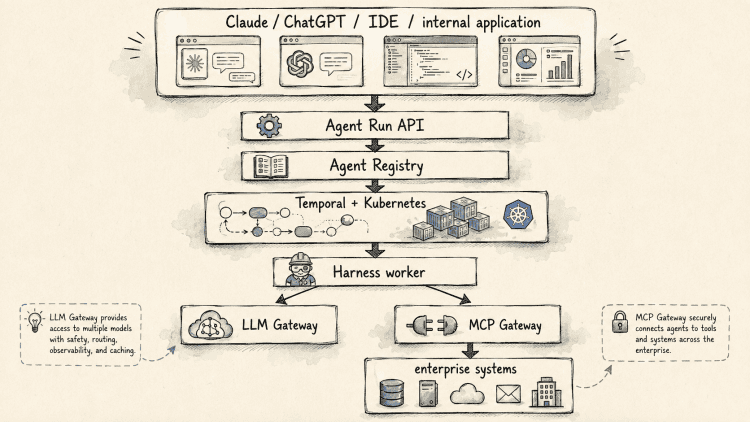
Identity and policy follow the run through the whole system. The harness remains replaceable.
That last part is probably the reason I like this design.
A year from now the agent loop we consider state of the art will almost certainly look different. Models will get better, frameworks will disappear, new ones will become fashionable and some of the things we currently implement in harnesses will move into models themselves.
I don’t see a similar reason for GitHub credentials to move into prompts, for a six-hour task to depend on a laptop staying open, or for an agent framework to decide whether an employee is allowed to restart a production service.
So for a first enterprise agent platform I wouldn’t try to build the perfect agent runtime. I’d build a small execution environment around the parts that are unlikely to change: identity, delegated authority, durable execution, controlled side effects and enough evidence to understand what happened afterwards.
The agents can change on top of it.
I’ve placed a more detailed, full-fledged version of the architecture here. Feel free to read it and send feedback.
bogdan » Stop Searching by Coincidence: Model Management and Workload Prioritization
07:54 am on Jul 27, 2026 | read the article | tags: medium
Building a production-ready semantic search platform requires more than decoupling the application from the vector database. Once machine learning models enter the runtime path, the system acquires another set of operational constraints. Model servers are computationally expensive, can be slow to scale, and often have memory requirements large enough to affect the rest of the platform unless inference capacity is managed deliberately.
In the previous article, I explained how Kubernetes became the portability substrate for the platform and how tenant-aware routing and backend-specific adapters decoupled the storage layer. The same design philosophy needs to extend to the machine learning components because model artifacts are large, startup behavior is expensive, and inference requests do not all operate under the same latency requirements.
This part of the series examines the changing embedding model landscape, the trade-offs behind packaging model artifacts inside container images, and the need to treat search and document indexing as distinct workload classes.
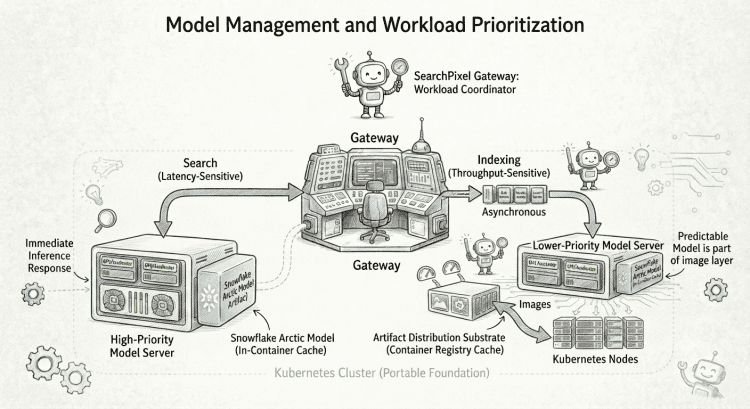
The Moving Target of Embedding Models
Once I accepted that the vector database had to remain replaceable, it became difficult to justify coupling the platform permanently to one embedding model. Model coupling is potentially even more restrictive because the embedding ecosystem is evolving faster than the storage layer.
New architectures continue to appear, benchmark positions change, multilingual retrieval improves, context lengths increase, vector dimensions shift, sparse retrieval techniques evolve, and models become more efficient on available hardware. These changes can affect retrieval quality, infrastructure cost, and the shape of the vectors stored in the database.
There is also no reason to expect one model to dominate every retrieval workload. A product catalogue, a technical documentation corpus, and a multilingual editorial website represent different search problems. A model that performs well on average across a public benchmark may still be the wrong operational choice for a specific corpus, language, latency target, or hardware profile.
This is why I follow benchmarks such as the MTEB leaderboard without treating them as a static purchasing table. Their value is not limited to identifying which model currently ranks near the top. They also show how quickly the landscape changes and how strongly retrieval quality depends on the characteristics of the task.
For that reason, the architecture treats the model server as another routing target. The gateway can send an inference request to a selected model deployment and receive a normalized response that the rest of the search system understands. Snowflake Arctic is currently central to my setup because the platform needs both dense and sparse representations for hybrid retrieval, but the surrounding architecture does not assume that it will remain the preferred model indefinitely.
Model routing creates an infrastructure problem that differs from storage routing. A vector database is stateful because it stores a large amount of derived retrieval data. A model server may be stateless from the perspective of user data, but its model artifact can be several gigabytes in size. This has direct consequences for startup behavior and horizontal autoscaling.
A conventional stateless API container can usually start relatively quickly because its image contains a small application binary and a predictable set of dependencies. Kubernetes schedules the pod, starts the process, waits for the readiness probe, and begins routing traffic once the application is ready.
A model-serving pod may spend much longer in the startup path. When the container downloads its model from remote object storage after startup, the pod can already be scheduled while remaining unable to answer requests. The effective scale-out time now includes downloading the artifact, extracting it, loading the model into memory, and potentially initializing an accelerator.
As a result, the workloads that benefit most from burst capacity can also be among the slowest to scale. Adding a replica does not immediately add usable inference capacity if every new pod must first retrieve and load a large external artifact.
My current approach is to package the model artifact directly inside the container image. This differs from the more conventional separation between application releases and large data artifacts. Keeping the two separate usually makes sense because it avoids rebuilding a large image whenever the model changes and allows model storage to evolve independently from the serving code.
For this platform, however, predictable startup and node-local caching are more valuable than maintaining that separation.
Once a Kubernetes node has pulled the model image, additional pods using the same image can reuse the cached layers rather than downloading the model again from an external location. The container registry therefore participates in model distribution, while Kubernetes nodes provide a local cache for the complete serving artifact.
The resulting image is large, but startup behavior on an existing node becomes more predictable. A pod can begin loading the model immediately from the local image rather than depending on the availability and transfer speed of a separate artifact service.
Packaging the model with the inference code also improves reproducibility. A specific image tag identifies both the serving implementation and the exact model artifact expected by that implementation. Rolling back a deployment restores both together, avoiding situations where an older application release retrieves a newer model revision from a mutable external location.
This approach has visible costs. A fresh node still has to pull the full image at least once. Large images increase registry bandwidth requirements, and every model release requires a new image build. Initial distribution to new nodes may remain slow, particularly when several nodes need the artifact at the same time.
I am comfortable with those costs because they are explicit and because node-local caching improves the more common scaling path in which additional pods start on nodes that already contain the image.
Faster pod startup reduces one source of delay, but it does not by itself solve inference capacity management. Search and indexing still compete for the same model resources unless the architecture treats them as workloads with different operational contracts.
Search and Indexing Have Different Operational Requirements
A semantic search platform should not treat every inference request as equivalent because search and indexing differ in latency sensitivity, throughput requirements, and acceptable completion time.
A search query is part of an interactive request. A person enters text into a search interface, the request reaches the gateway, and the system must generate an embedding before retrieval can begin. Time spent waiting for inference capacity contributes directly to the latency experienced by the user.
Document ingestion has a different completion requirement. A new product, article, or page needs to become searchable, but the embedding and indexing work does not normally have to finish before the HTTP request that submitted the document returns.
The architecture can therefore handle the two paths differently. Search is synchronous and latency-sensitive, while indexing is asynchronous and throughput-sensitive. Both depend on the same inference infrastructure, but they should not receive the same scheduling priority.
Suppose a tenant uploads a large product catalogue and thousands of documents enter the embedding pipeline. Shortly afterwards, another user submits a search query. If both request types are placed into the same first-come, first-served stream, the interactive query may wait behind a substantial amount of bulk indexing work.
The platform can still appear healthy under those conditions. The model server may report excellent throughput, CPU or accelerator utilization may remain high, and operational dashboards may show that every available resource is being used efficiently. Those metrics do not account for the fact that latency-sensitive queries are waiting behind work with a much more flexible deadline.
I therefore treat the platform as having priority tiers rather than exposing one undifferentiated inference path. Search requests receive preferential access to model capacity because they belong to an interactive critical path. Indexing requests can tolerate queueing because the ingestion flow is already asynchronous.
This does not make indexing less important. Once the platform accepts a document, that document still needs to become searchable, and the asynchronous path must eventually converge toward the indexed state. The distinction is that the two workloads are governed by different service expectations.
Search has a latency target.
Indexing has a freshness target.
These contracts should be visible in the architecture rather than mixed into one generic workload queue.
Autoscaling remains useful, but it solves a different part of the capacity problem. Model replicas contain large artifacts, consume substantial memory, and may require expensive or scarce hardware. New capacity may take time to become available even after the autoscaler decides that more replicas are required.
Autoscaling changes how much capacity the system will have. Prioritization determines how the capacity that already exists is allocated when search and indexing compete for it. The platform needs both mechanisms because adding future capacity does not protect an interactive request that is waiting now.
These requirements also clarify the role of the API gateway. Once the system has multiple vector database targets, replaceable model deployments, tenant-specific configuration, and several request priority classes, clients should not be responsible for selecting the correct combination themselves.
The architecture needs a coordination layer that understands the authenticated tenant, resolves the appropriate model and storage targets, and distinguishes between synchronous search and asynchronous ingestion. The API gateway therefore operates as more than a reverse proxy. It becomes a tenant-aware workload coordinator that centralizes placement, routing, authentication, and priority decisions.
In the final part of this architecture series, I will examine that coordination layer in detail. I will explain why I implemented it in Go, how it separates the synchronous search path from asynchronous document ingestion, how NATS carries accepted work toward eventual indexing, and how retries and dead-letter handling prevent processing failures from becoming silently lost documents.
bogdan » Stop Searching by Coincidence: Portability and the Storage Decoupling Layer
09:47 pm on Jul 6, 2026 | read the article | tags: medium
Most architecture diagrams are much easier to understand after the system has already been built. You look at the boxes, see an API gateway connected to an embedding model, a vector database, a message broker, and a relational database, and the design appears almost inevitable. Of course the query goes there. Of course ingestion goes through a queue. Of course the model is separated from the application.
The problem is that real systems rarely emerge that cleanly. They grow from constraints. One choice creates pressure somewhere else. Solving that pressure introduces another requirement. Eventually, the architecture starts to look deliberate, but the interesting part is not the final diagram. The interesting part is understanding why the boundaries exist in the first place.
The system I have been building powers SearchPixel, but the infrastructure is intentionally broader than a WordPress search plugin. At its core, it is infrastructure for multi-tenant semantic search and retrieval workloads. It needs to accept documents, transform them into representations suitable for retrieval, store those representations, execute low-latency hybrid searches, and remain flexible enough that neither the vector database nor the machine learning model becomes a permanent architectural dependency.
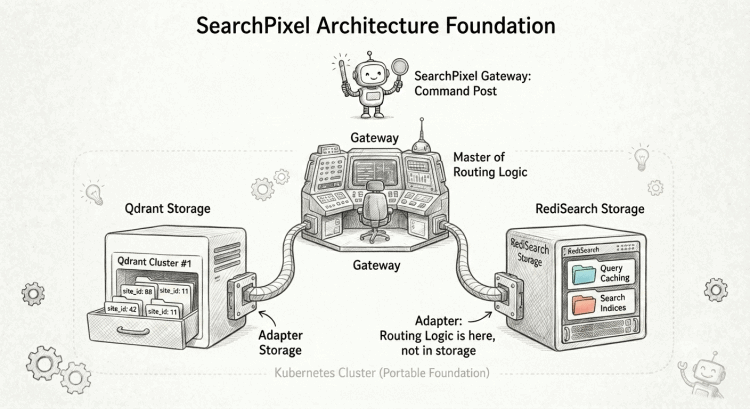
The system uses Kubernetes as its infrastructure backbone, a Go API gateway as its coordination layer, Snowflake Arctic as the primary embedding model, Qdrant as the primary vector database, MySQL for tenant and credential configuration, and NATS for the asynchronous ingestion path.
Kubernetes Was the First Architectural Boundary
I started with Kubernetes before choosing most of the application components. That may sound backwards, as a common approach is to build the application first and decide how to deploy it later. For this system, infrastructure portability was already one of the product requirements, so deployment could not be treated as an implementation detail. I wanted to preserve two very different operating modes.
At one end, I wanted the ability to run on a public cloud using a managed control plane. At the other end, I wanted to be able to move the same workloads onto cheaper infrastructure and operate the cluster myself when cost became more important than convenience. Those two environments are not identical, and I do not pretend Kubernetes magically erases every difference between providers. Storage, networking, load balancers, GPU availability, and node provisioning remain provider-specific concerns. What Kubernetes gives me is a stable operational boundary above those differences.
My model servers are pods. The API gateway is a deployment. Qdrant is stateful infrastructure with persistent storage. NATS is another network service. Configuration is declarative. Service discovery follows the same conceptual model regardless of whether the nodes underneath happen to come from a large public cloud or from a cluster I manage myself.
That distinction matters because cost curves change as systems grow. A managed service can be an excellent choice when operational simplicity is more valuable than infrastructure cost. The calculation changes when traffic becomes predictable, when workloads are large enough to justify dedicated nodes, or when expensive inference hardware dominates the bill. I did not want a future decision to move infrastructure to require redesigning the application at the same time. Kubernetes therefore became less of a deployment tool and more of an architectural portability layer.
There was another reason for making that choice early. Machine learning infrastructure is unusually heterogeneous. An API service, an embedding model, and a vector database do not scale in the same way. They do not have the same memory profile. They do not start at the same speed. They do not fail for the same reasons. A stateless network service may scale horizontally in seconds. A model server may need a large artifact before it can answer its first request. A vector database may need stable local storage and careful placement. I wanted an infrastructure substrate where those workloads could coexist without pretending they were the same.
This decision also explains my preference for relatively plain Kubernetes manifests, Kustomize, and FluxCD. I am not opposed to Helm in principle. I simply prefer to keep the deployment model visible when I am responsible for operating the system, especially because I pay for this infrastructure out of my own pocket. I want to be able to inspect a StatefulSet and understand what is running, how storage is mounted, how a node starts, and where configuration comes from.
Isolating Storage via the Adapter Pattern
Semantic search systems have a natural tendency to organize themselves around the vector database. It makes sense, because the vector store sits directly on the critical query path. It contains expensive derived data. Its indexing strategy affects latency, recall, memory consumption, and operational cost. Once enough data accumulates, migrating away from it can become painful. That is exactly why I did not want the rest of the system to become structurally dependent on one database.
Today, Qdrant is my primary vector engine. I wrote a separate article about why I chose it, so I will not repeat that evaluation here. The more important architectural decision is that Qdrant is a routing target, not the identity of the platform.
In practice, the storage decoupling layer is not a universal database API. It is the combination of tenant-aware placement, backend-specific adapters, and a gateway that keeps those decisions away from clients. To achieve this, the gateway isolates backend-specific behavior behind small storage adapters. The request path resolves the tenant’s configured backend and dispatches the operation to the corresponding implementation. The goal is not to pretend every vector database has identical semantics. It is to keep backend placement and backend-specific query construction out of the external API and the higher-level request flow. When a request reaches the gateway, the system does not simply assume a collection or index structure. Instead, tenant configuration identifies both the backend type and the target indexing node. The gateway resolves that placement at request time and sends the operation through the corresponding backend adapter.
My current production gateway code still contains both Qdrant and RediSearch paths operating behind this abstraction layer. This design choice is larger than merely preserving backward compatibility with Redis. I do not believe a single vector database will necessarily remain the correct answer for every retrieval workload, because the underlying ecosystem is changing too quickly for that assumption to be comfortable. Databases are constantly adding sparse vectors, new quantization techniques, disk-backed indexes, late interaction support, GPU acceleration, and different approaches to distributed search. A design that is optimal today can become an operational bottleneck surprisingly quickly.
There is also a more fundamental distributed systems reason for application-level database routing. Horizontal scalability is not infinite in the way abstract cloud marketing benchmarks suggest. It is easy to say that a database scales horizontally, but that phrase hides the cost of coordination. As a distributed dataset grows, queries may touch more partitions, replication consumes more bandwidth, rebalancing becomes more expensive, coordination surfaces expand, and tail latency becomes increasingly sensitive to the slowest participant in a distributed operation. At some point, depending on the workload, adding more capacity to a single logical database cluster produces diminishing returns.
For a multi-tenant system, this is especially important because tenants already provide a natural partitioning dimension. There is no inherent reason every independent website must live inside one globally scaled vector database cluster. A collection of tenants can be assigned to one Qdrant deployment, another collection to a second deployment, and a particularly heavy tenant can be completely isolated on its own dedicated database node if its workload justifies it.
Consider a deployment serving thousands of relatively small websites. Most of them may fit comfortably on a shared Qdrant cluster. Then one customer arrives with a catalogue larger than hundreds of existing tenants combined and a sustained query profile that changes the capacity model. I do not want the only response to be scaling the shared cluster for everyone. The routing layer gives me another option: place that tenant elsewhere without changing the client API or forcing unrelated tenants to absorb the operational consequences.
Independent deployments also create a useful failure boundary. Scaling is not the only reason to separate workloads; sometimes the goal is simply to prevent one pathological tenant or one overloaded cluster from becoming everybody’s incident.
Database sharding asks how to distribute data inside a database system, whereas application-level routing asks whether all data needed to be inside the same database system in the first place. For a strongly multi-tenant workload, I want both options. That is why the indexing node and indexing backend belong to tenant configuration rather than being hardcoded into application logic. It means that introducing another vector engine later can remain primarily a local adapter problem rather than becoming a platform-wide migration.
Decoupling storage solved one class of future migration, but it exposed the next assumption in the system. A hybrid search request does not begin at the database. It begins with a machine learning model, and those models evolve even faster than storage engines. The moment I accepted that the vector database could not define the platform, I had to admit that the embedding model could not define it either. That is where the next part begins.
bogdan » Stop Searching by Coincidence: Why I Swapped RediSearch for Qdrant
12:05 am on Jun 25, 2026 | read the article | tags: medium
This is the next step in my series that started with Stop Searching by Coincidence. In my last post, I argued that hybrid search isn’t optional for e-commerce relevance. But making that theory boringly reliable in production? That’s another beast. This article is about that second step: choosing the engine that could carry it all.
My constraints were not your typical, venture-backed «RAG startup» constraints. Though I wish they were! If you’re a VC looking to write a check, don’t be shy. Back to the topic: they were operationally specific, born from firsthand experience managing hundreds of millions of vectors across thousands of collections, all while hitting tight, double-digit millisecond latency targets for thousands of requests per minute. Building this production system on my own, on infrastructure I’m paying for, and having to manage it outside of working hours, changes the math. I don’t have the luxury of wrestling with the unnecessary abstraction layers that complex Helm charts often introduce. I want maximum predictability and zero black boxes, which is why I’m keeping the database tier raw while still leveraging FluxCD for clean GitOps.
When you view the database landscape through that lens, the options narrow quickly. If all I wanted was raw capability, Vespa would have stayed in the final round longer. If all I wanted was a giant distributed vector platform, Milvus would have stayed there too. If all I wanted was managed convenience, Pinecone would be hard to ignore.
But I needed a serious vector database that delivers sparse vectors, native hybrid search primitives, predictable persistence, and a deployment model that feels close to «run the binary, mount the volume, wire the StatefulSet».
That is how I ended up choosing Qdrant. It provides first-class sparse vectors, server-side fusion (RRF/DBSF), robust snapshotting, and an elegant single-process model written in Rust that leaves less operational surface area than its multi-service competitors.
But let’s be perfectly honest: Qdrant isn’t magic, and getting it to fit my architecture required tearing up my original playbook.
The Problem I Was Actually Solving (And the Redis Breaking Point)
A lot of vector database comparisons quietly assume a single large corpus, one product team, and one clean retrieval stack. What I am building with my plugin is closer to a fleet problem: managing thousands of independent e-commerce sites.
I wasn’t starting from zero. The early versions of the architecture relied on a Redis + RediSearch setup. I liked it. It was fast, and it fit naturally with per-site allocation using a custom knapsack strategy across master/replica pairs. In fact, the current codebase still supports RediSearch. I deliberately kept it there because I’m considering offering a self-hosted «appliance» version down the road: a quick Docker Compose or Helm chart for people who want to index internal documents on their own iron.
But for the multi-tenant SaaS scale I wanted, RediSearch hit three massive walls:
- The Ephemeral Anxiety: I’ve seen firsthand what happens when a RediSearch replica crashes with tens of millions of records on the line. Watching an instance take over two hours to rebuild an HNSW index while repeatedly expanding capacity during startup is the kind of behavior that ages a developer prematurely.
- Rudimentary Hybrid Support: While Redis has introduced tools like
FT.HYBRID, its native hybrid capabilities felt rudimentary compared to dedicated engines. After experiment after experiment, I realized that without deep, server-side hybrid reranking, the search results just weren’t matching user intent. - The Licensing Hand Grenade: The recent Redis licensing shifts threw a wrench into the ecosystem. Compounding that, the early state of search support in open-source alternatives like Valkey meant that betting the future of my infrastructure on this path felt like building on shifting sand.
I also took a hard look at Vespa. I met one of the Vespa developers, and talking to them was actually what triggered my obsession with hybrid search. Vespa is a phenomenal engineering achievement with a brilliant phased-ranking model. But its self-managed architecture requires config servers and Apache ZooKeeper.
Between work deadlines and the occasional overtime, my energy for managing infrastructure after hours is limited. I didn’t want to spend my nights babysitting ZooKeeper.
I needed a lean, boring, cloud-native operating model.
The Shortlist and How It Shook Out
I evaluated the candidates against seven core criteria: performance headroom, true on-disk persistence, native sparse/dense hybrid support, Kubernetes simplicity, multi-tenant scalability, low operational cost, and structural alignment with how I already think about data placement.
| Candidate | Persistence Story | Hybrid / Sparse Support | Deployment Shape | Best Fit | My Read |
|---|---|---|---|---|---|
| Qdrant | Snapshots, mmap/on-disk HNSW. Shards ready immediately on target. | First-class sparse vectors; server-side RRF and DBSF. | Single binary/container. Built-in cluster mode. | Teams wanting serious vector search without platform bloat. | Chosen |
| Weaviate | Persistent storage and crash-tolerant writes. | Native BM25 + vector hybrid. | Kubernetes path is heavily Helm-first. | Teams wanting an all-in-one stack comfortable with Helm. | Good tech, wrong operational shape for me. |
| Milvus | Highly durable distributed layers, but broad dependency footprint. | Native BM25 and sparse vectors. | Requires an Operator/Helm; relies on etcd, Pulsar, and MinIO. | Massive enterprise teams with dedicated infra engineers. | Incredibly powerful, far too heavy for a lean project. |
| Vespa | Mature serving engine; self-managed requires ZooKeeper. | Peerless hybrid ranking flexibility. | Operator/Helm-based; substantial footprint. | Search-centric enterprises willing to operate heavy machinery. | Brilliant engineering, but a massive operational commitment. |
| Pinecone | Managed-first. “Pinecone Local” is just an emulator. | Excellent hybrid and sparse support. | SaaS-only; poor fit for self-hosted K8s constraints. | Teams optimizing for zero-ops over control. | Violates my requirement for infrastructure control. |
And Qdrant Won (also the Naming Pivot)
When I first started sketching out this project, I called it ThinkPixel. I liked the sound of it, but when I ran it by my successful plugins-developing friends, they gave me some blunt, necessary feedback: “Make it explicit. Put ‘Search’ in the name.” They were right. The project became SearchPixel, and Qdrant became its engine.
Qdrant won because it nailed the operational sweet spot. Its clustering model is built right into the core process itself. To spin up a cluster, you enable cluster mode, give the first peer a --uri, and let the other peers join with a --bootstrap command. Conceptually, it behaves like a single clustered storage process rather than a massive distributed ecosystem.
Furthermore, independent evaluations (like Reddit Engineering’s public write-up) confirm that while platforms like Milvus excel at decoupling ingestion from query loads at massive scale, Qdrant consistently wins on raw, single-node query latency. For SearchPixel, a simpler architecture with blazing p99 latency was vastly more valuable than a sprawling ecosystem built for someone else’s scale.
The Multitenancy Reality Check
I do not want to oversell it: arriving at this setup came with a heavy dose of initial architectural frustration.
My original plan was simple: create one physical Qdrant collection per WordPress site. It mirrored my Redis mental model perfectly. Then I hit a wall in Qdrant’s production documentation:
Do not create thousands of tiny collections. It is an explicit anti-pattern that destroys performance and spikes metric cardinality.
I was incredibly frustrated. I almost walked away. But instead of abandoning the engine, I looked at how to adapt.
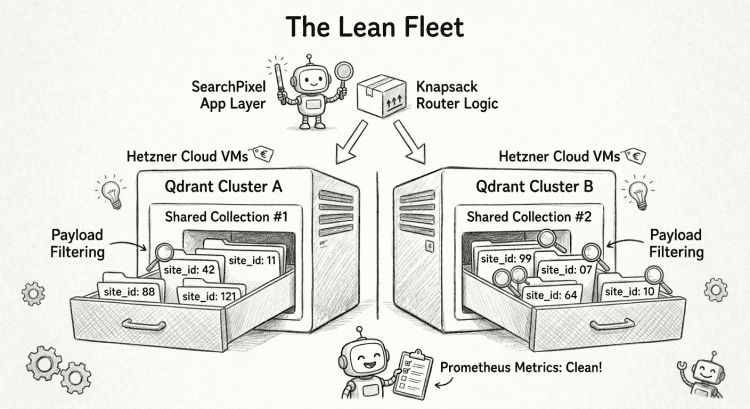
Instead of creating 100,000 separate collections, the correct pattern is to create a modest number of large, shared collections grouped across multiple independent Qdrant clusters. I use a payload index on site_id (marked with is_tenant: True) and force a filter on every single incoming query.
By combining Qdrant’s payload filtering with my existing knapsack allocation logic at the application layer, I got the best of both worlds:
- Bounded Blast Radius: A noisy neighbor site can only impact the specific cluster slice it sits on, not the whole fleet.
- Scale Without Bloat: I avoided turning thousands of sites into thousands of physical collections, keeping Prometheus metrics clean.
- Code Reuse: I got to preserve the scheduling logic I had already spent weeks writing for the original Redis architecture.
How SearchPixel Uses Qdrant in Production
In my production stack, I handle hybrid search entirely on the server side using Qdrant’s Reciprocal Rank Fusion (RRF).
Below is a minimal, production-aligned Python example that runs a true hybrid search against Qdrant: it fuses a sparse (BM25-style) and dense (semantic) query using server-side Reciprocal Rank Fusion, while isolating results by site_id inside a shared multi-tenant collection:
from qdrant_client import QdrantClient, models

def hybrid_search(indexing_node: str, collection_name: str, dense_vector: list[float], sparse_vector: dict[int, float], site_id: str, limit: int = 20):
    # Initialize the Qdrant client (connects to the node handling this site)
    client = QdrantClient(url=indexing_node)

    # Perform a hybrid query with dense + sparse prefetch and server-side RRF fusion
    response = client.query_points(
        collection_name=collection_name,

        # Use `prefetch` to define multiple vector searches that will be fused
        prefetch=[
            models.Prefetch(
                query=dense_vector,
                using="dense",  # Use the dense vector field
                limit=limit,
                query_filter=models.Filter(
                    must=[models.FieldCondition(
                        key="site_id",
                        match=models.MatchValue(value=site_id)  # Enforce multi-tenant isolation
                    )]
                )
            ),
            models.Prefetch(
                query=models.SparseVector(
                    indices=list(sparse_vector.keys()),   # Sparse token IDs (e.g. BM25 terms)
                    values=list(sparse_vector.values())   # Corresponding weights
                ),
                using="sparse",  # Use the sparse vector field
                limit=limit,
                query_filter=models.Filter(
                    must=[models.FieldCondition(
                        key="site_id",
                        match=models.MatchValue(value=site_id)
                    )]
                )
            )
        ],

        # Apply Reciprocal Rank Fusion (RRF) to merge dense + sparse results
        query=models.RrfQuery(rrf=models.Rrf(k=60)),

        # Final result limit after fusion
        limit=limit,

        # Fetch only the fields we care about in the result
        with_payload=models.WithPayloadSelector(
            include=models.PayloadIncludeSelector(fields=["post_id", "text"])
        ),
    )

    # Extract simplified result objects
    return [
        {
            "id": point.payload.get("post_id"),
            "text": point.payload.get("text"),
            "score": point.score
        }
        for point in response
        if point.payload is not None
    ]
(Note: If you are doing rapid client-side experimentation or complex A/B testing with custom business weights, you can calculate fusion manually in your application code. But for predictable, low-latency production execution, offloading RRF entirely to the database layer is an absolute game-changer.)
The Vanilla Kubernetes Blueprint
To keep operations lean, I bypass Helm charts and operators entirely. Because Qdrant doesn’t require an external cluster state manager, you can coordinate a resilient, self-bootstrapping 3-node cluster natively inside a vanilla Kubernetes StatefulSet.
Here is the exact configuration shape I use to ensure peers bootstrap automatically using the stateful pod network identity:
apiVersion: apps/v1
kind: StatefulSet
metadata:
  name: qdrant
spec:
  replicas: 1  # Single-node for now; can be scaled out later with cluster mode
  serviceName: qdrant  # Required for stable DNS identity in StatefulSets
  selector:
    matchLabels:
      app.kubernetes.io/name: qdrant
  template:
    metadata:
      labels:
        app.kubernetes.io/name: qdrant
    spec:
      initContainers:
        # Ensure volumes have correct ownership before main container starts
        - name: ensure-dir-ownership
          image: docker.io/qdrant/qdrant:v1.13.4
          command: ["chown", "-R", "1000:2000", "/qdrant/storage", "/qdrant/snapshots", "/qdrant/snapshot-restoration"]
          volumeMounts:
            - name: qdrant-storage
              mountPath: /qdrant/storage
            - name: qdrant-snapshots
              mountPath: /qdrant/snapshots
            - name: qdrant-snapshot-restoration
              mountPath: /qdrant/snapshot-restoration

      containers:
        - name: qdrant
          image: docker.io/qdrant/qdrant:v1.13.4
          command: ["/bin/bash", "-c"]
          args: ["./config/initialize.sh"]  # Custom script for first-time init or snapshot restoration
          env:
            - name: QDRANT_INIT_FILE_PATH
              value: /qdrant/init/.qdrant-initialized  # Used by your script to detect first-time boot
          ports:
            - name: http
              containerPort: 6333
            - name: grpc
              containerPort: 6334
          readinessProbe:
            httpGet:
              path: /readyz
              port: 6333  # Qdrant’s built-in readiness endpoint
          securityContext:
            runAsUser: 1000
            runAsGroup: 2000
            runAsNonRoot: true
            allowPrivilegeEscalation: false
            readOnlyRootFilesystem: true  # Enforces tight security profile
          volumeMounts:
            - name: qdrant-storage
              mountPath: /qdrant/storage  # Persistent vector index data
            - name: qdrant-snapshots
              mountPath: /qdrant/snapshots  # Snapshot output directory
            - name: qdrant-snapshot-restoration
              mountPath: /qdrant/snapshot-restoration  # Where snapshots get restored from
            - name: qdrant-config
              mountPath: /qdrant/config/initialize.sh
              subPath: initialize.sh  # Your bootstrap script
            - name: qdrant-config
              mountPath: /qdrant/config/production.yaml
              subPath: production.yaml  # Optional override config
            - name: qdrant-init
              mountPath: /qdrant/init  # Temp marker dir for init checks

      volumes:
        - name: qdrant-config
          configMap:
            name: qdrant-config  # Provides both the init script and config file
        - name: qdrant-init
          emptyDir: {}  # Used for writing a boot-complete marker file
  volumeClaimTemplates:
    - metadata:
        name: qdrant-storage
      spec:
        accessModes: ["ReadWriteOnce"]
        resources:
          requests:
            storage: 200Gi
    - metadata:
        name: qdrant-snapshots
      spec:
        accessModes: ["ReadWriteOnce"]
        resources:
          requests:
            storage: 200Gi
    - metadata:
        name: qdrant-snapshot-restoration
      spec:
        accessModes: ["ReadWriteOnce"]
        resources:
          requests:
            storage: 200Gi
Cluster mode in Qdrant doesn’t require an external consensus service. Instead, I use a tiny initialize.sh script that uses StatefulSet DNS and a consistent peer URI strategy. Pod 0 becomes the initial node, and all others bootstrap from it using –bootstrap.
#!/bin/sh

# Extract the pod index from the StatefulSet hostname
# e.g. qdrant-0 → 0, qdrant-2 → 2
SET_INDEX=$${HOSTNAME##*-}

# For the first pod (index 0), start the cluster and
#   become the initial peer
# https://github.com/qdrant/qdrant/blob/master/tools/entrypoint.sh
if [ "$SET_INDEX" = "0" ]; then
  exec ./entrypoint.sh --uri 'http://qdrant-0.qdrant:6335'
else
  # For other pods, join the cluster by bootstrapping from pod 0
  exec ./entrypoint.sh \
    --bootstrap 'http://qdrant-0.qdrant:6335' \
    --uri "http://qdrant-$SET_INDEX.qdrant:6335"
fi
Moving Forward Natively
If you are currently evaluating vector search engines for a multi-tenant or multi-site workload, save yourself the abstract benchmark review sessions and follow a boring, systematic migration path:
- Build a workload-accurate benchmark: Do not test using random Wikipedia datasets. Use your production product catalog, your exact sparse tokenizer, your real filters, and your real multi-tenant query distributions.
- Pre-index your payloads: Map out fields like
site_id,category, andbrandinto payload indexes before you push data to avoid paying an unindexed disk-access tax later. - Optimize for the bulk load: When performing backfills, temporarily adjust your configuration to drop
indexing_thresholdorm: 0to bypass HNSW graph construction overhead during initial hydration. Re-enable it only when your initial data is warm. - Automate your disaster recovery drills: Rebuild tolerance sounds great in architectural planning sessions, but it’s an entirely different story when an outage hits on a Friday evening. Leverage external, S3-compatible snapshotting from day one.
In the next post in this series, I’ll show you a bird’s-eye view of the overall infrastructure architecture. I’ll break down the main architectural components, map out what lives where, and look at how I’m running this cluster on bare-metal virtual servers inside Hetzner. Spoiler alert: because I appreciate highly performant, remarkably affordable, European-based cloud providers when I’m bootstrapping on my own dime.
If you want to track how to take hybrid search out of the research lab and make it stay completely boring in production, hit the follow button and stay tuned. For now, Qdrant does exactly what I ask of it: stay fast, stay boring, and stay out of the way.
bogdan » Moving from Stateless LLMs to Situated Intelligence
10:45 pm on Jun 10, 2026 | read the article | tags: medium
We’ve spent the last few years treating LLMs as if their main advantage is that they know almost everything. They can explain quantum mechanics, debug a convoluted CSS grid layout, and rewrite Romanian manele (you have been warned!) lyrics in the voice of Constantin Noica. But there is a fundamental mismatch between how these models work and how we actually make decisions.
The basic LLM interaction is still mostly stateless. Even when products add chat history or file uploads, the model itself does not automatically maintain an inspectable, evolving model of your projects, stakeholders, failed attempts, beliefs, and outcomes. You end up re-explaining the same constraints, re-contextualizing the same stakeholders, and re-hashing the same history. It’s like trying to lead a project while suffering from short-term memory loss.
I built SecondContext to bridge that gap. It is a prototype for an LLM assistant that behaves more like a situated expert: a system that accumulates experience alongside you.
Rather than treating every interaction as a blank slate, SecondContext operates as a persistent cognitive layer. It stores structured memories about people, projects, beliefs, and outcomes. If I ask it to help me draft an infrastructure proposal review for Alex, it doesn’t just output generic corporate filler. It has context that Alex is competent but perpetually busy, that he responds better to a narrow, API-focused scope, and that my previous attempts worked only when I presented a specific technical constraint. The assistant doesn’t just draft the message; it suggests the strategy, warns me about the risks, and generates follow-up scenarios based on how these people have responded to me in the past.
The common engineering answer to this problem is RAG: Retrieval-Augmented Generation. RAG is useful, but most systems are optimized for retrieving facts from static documents. SecondContext uses retrieval too, but the object being retrieved is different: not only documents, but accumulated work context: people, outcomes, preferences, failed strategies, uncertainty, and changing beliefs.
There is an obvious risk here: a memory system about people can become creepy or overconfident very quickly. That is why I think the important design principle is not just persistence, but inspectable persistence. SecondContext stores evidence, confidence, timestamps, and uncertainty; it distinguishes observations from interpretations; and it makes memories editable and deletable. A situated assistant should not secretly profile people. It should expose the assumptions it is using.
This architecture also aligns with the academic work around CoALA: Cognitive Architectures for Language Agents. I didn’t set out to build a formal cognitive architecture. I just wanted an assistant that remembered that Alex hates vague emails. But looking at the literature, the direction feels clear: useful agentic behavior requires a modular way to perceive, store, retrieve, act, and update. SecondContext is a practical, narrow-scoped implementation of these principles. It is a move toward building agents that aren’t just smarter, but more situated: able to function as persistent teammates rather than search engines trapped in chat boxes.
I’ve intentionally kept the stack boring: Go, Postgres, and Qdrant. No proprietary, un-debuggable decision layer. The goal is to keep the system inspectable and transparent. If the assistant gives a bad recommendation, I want to see exactly why it retrieved that specific memory, how it scored that strategy, and what evidence led to its current belief.
The current version is already a working MVP, with a baseline that supports memory ingest and search, hybrid retrieval, salience reranking, person/topic summaries, belief tracking, scenario generation, outcome feedback, and a debug view for comparing stateless versus memory-augmented responses.
This is still an experiment. It is narrow, early, and intentionally boring in its implementation. But it is testing a simple hypothesis: for recurring work, intelligence without memory is mostly a party trick. Intelligence with inspectable memory, feedback, and uncertainty can become a real tool.
You can find the architecture, demo, and code here: https://github.com/bdobrica/SecondContext
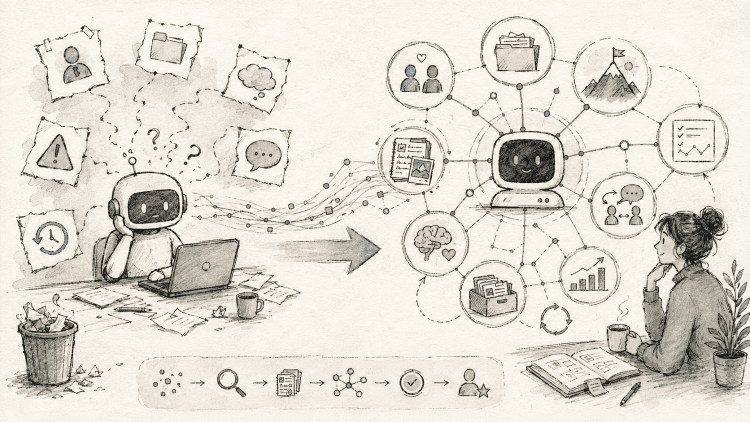
bogdan » Stop Searching by Coincidence: The Case for Hybrid WordPress Search
05:10 pm on May 17, 2026 | read the article | tags: medium
I like WordPress. I’ve been using it long enough to know where it shines and where it very clearly doesn’t.
Search is one of those areas everyone quietly accepts as “good enough”, until the moment it actually matters. And when it does, you start noticing that WordPress search is not really search in the way users expect it to be. It’s closer to a polite filter. A LIKE query with a UI.
This article is the first in a series where I’ll document how I ended up building SearchPixel, a WordPress plugin backed by a separate search infrastructure that tries to move from string matching to meaning matching.
Before getting into embeddings, hybrid ranking, or architecture, I want to start with the uncomfortable part: why this problem exists at all.
Because if we don’t agree there’s a real problem here, everything else just looks like unnecessary complexity.
What WordPress search actually does
At its core, WordPress search is fairly simple. It takes the query string, splits it into words (loosely), generates an SQL query, then runs a set of LIKE '%term%' conditions over post title, content and excerpt to return whatever matches.
LIKE answers this question:
does this exact sequence of characters appear somewhere in this text?
Users, however, are usually asking something closer to:
which page on this site talks about the thing I’m thinking of?
Those two questions overlap sometimes. Often by accident.
Humans search by meaning. LIKE searches by coincidence.
Users rarely type what you wrote. They type half-remembered ideas, synonyms, typos, vague descriptions, problems, not solutions.
Say you have a post titled:
“How to speed up WordPress with caching and CDN”
Users will search for something like: “site is slow”, “pages load slowly on mobile”, “optimize wordpress performance”, “cloudflare setup”, “cache plugin” or anything else vaguely related. Keyword search might do fine on “optimize wordpress performance”. It might get lucky with “cache plugin”. It will almost certainly miss “site is slow”. Not because the content isn’t relevant, but because relevance here is inferred from string overlap, not from meaning. And overlap is a fragile proxy.
Most improvements follow the same path. Start with better tokenization, weight titles higher, include tags and categories and do fuzzy matching from stemming and synonym lists. At some point, most people end up using an external search engine like Elasticsearch.
All of these help. A lot, actually. But they still rely on the same assumption:
relevance can be inferred from shared tokens
That assumption breaks in very predictable ways, mostly because human beings don’t coordinate their vocabulary with your content.
They will search for “cost” when your button says “price,” or “delivery” when your text says “shipping.” You can patch this by maintaining custom synonym dictionaries. It works, right up until it doesn’t, and you realize you’ve just built a brand-new maintenance problem.
Then, add human error to the mix. Combine fast typing with meme-generating mobile autocorrect, and your logs fill up with “aple,” “wordpres,” and “coudflare.” Keyword search doesn’t know what to do with a typo, so it just returns a blank page.
But the biggest breaking point is intent. If a user searches for “how to migrate” and your top article is titled “Moving between hosting providers”, a LIKE query treats them as entirely unrelated. They share no tokens.
By treating string overlap as a proxy for relevance, you aren’t actually matching intent—you’re just hoping for a linguistic coincidence. This will get worse really fast if you borrow idioms and expressions from other languages in your writing, turning “English” content into something only mostly English.
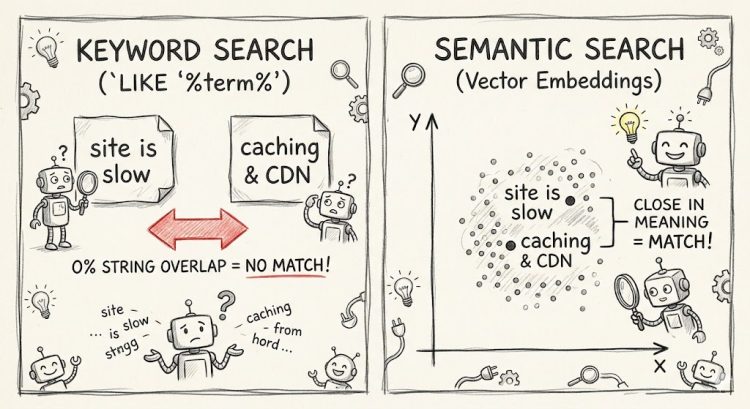
What hybrid search changes
To fix this, we have to change the underlying math of how search works. We start with semantic search to change the representation. Instead of comparing words, it compares embeddings: vector representations of text that (roughly) encode meaning. Queries and documents that talk about similar things end up closer together in this space. So “site is slow” can retrieve content about caching and CDNs, even if those exact words never appear. It’s not magic. It’s just a different coordinate system.
Keyword search asks: do these words overlap?
Semantic search asks: are these ideas related?
Both questions matter.
But semantic search has its own failure modes. It can be: too fuzzy, too tolerant and most of all surprisingly wrong in very confident ways. Exact matches still matter when you’re looking for error codes, version numbers, product names, quotes or any specific identifiers. Semantic search can rank “kind of related” above “exactly what I asked for”. Which is frustrating.
So this isn’t a “keyword vs semantic” story. It’s a both story. Hence the hybrid.
Why WordPress makes this harder than it sounds
There’s also an architectural reality check. WordPress is PHP, request–response, optimized for publishing and rendering pages. It’s not designed to run transformer models, compute embeddings, maintain vector indexes, perform semantic search, nor keep latency predictable under load. Sure, you can force it, but I wouldn’t recommend it.
The shape that makes sense, in practice, looks like this. You get a WordPress plugin for integration, UI, and content selection, paired with an external service for embeddings, indexing, and retrieval, with a clean API boundary between them.
That’s the direction SearchPixel took.
What SearchPixel is (today)
SearchPixel is a WordPress plugin plus a backend service that indexes selected WordPress content (you choose what goes in), then retrieves a capped number of top results to keep things fast by using a hybrid approach under the hood. All by trying to stay boring in production.
Right now it’s free while I iterate. If operating costs ever become significant, there will probably be a small cost attached because as far as I know, GPUs don’t run on enthusiasm alone.
What’s next
In the next article, I’ll move from “this is broken” to “this is how I designed around it”:
- architecture choices
- what runs where
- indexing trade-offs
- what I limited on purpose
- where latency actually comes from
For now, the short version is this:
WordPress search checks whether your content contains the words.
Semantic search checks whether your content contains the meaning.
Users usually come for meaning. So that’s where I started.
This is part one of an ongoing series building SearchPixel. If you want to catch the next post on architecture choices and indexing trade-offs, hit the Follow button so you don’t miss it.
find me:
in my mind:
- #artist 2
- #arts 4
- #away 3
- #bucharest 1
- #buggy 6
- #business 1
- #clothes 1
- #comics 1
- #contest 3
- #dragosvoicu 1
- #education 1
- #food 2
- #free-ideas 1
- #friends 14
- #hobby 23
- #howto 9
- #ideas 36
- #life lessons 4
- #me 59
- #medium 8
- #mobile fun 4
- #music 51
- #muvis 17
- #muviz 13
- #myth buxter 1
- #nice2know 15
- #night out 1
- #openmind 2
- #outside 3
- #poems 4
- #quotes 1
- #raspberry 4
- #remote 56
- #replied 51
- #sci-tech 7
- #sciencenews 1
- #sexaid 7
- #subway 39
- #th!nk 5
- #theater 1
- #zen! 4